
摘要:本文主要记录如何使用 RT-Thread Studio + CubeMX 来配置 STM32 上的 PWM 器件。
第一步、利用 RT-Thread Studio 配置 PWM 相关代码(接着 UART2 项目进行)
首先在 board.h 中官方给出了如何在 rtt 中使用 pwm。
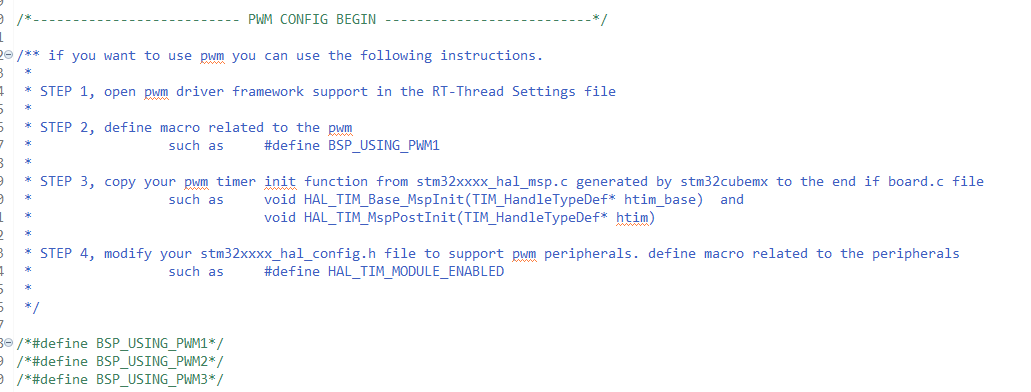
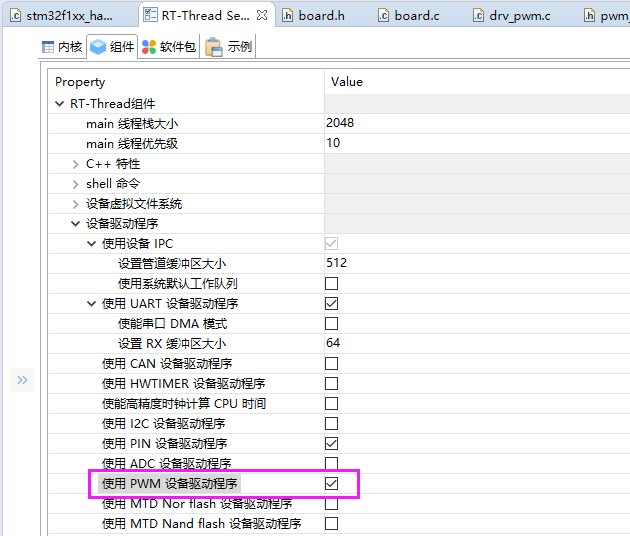
- STEP 1:RT-Thread Settings 中打开 PWM 驱动支持。
-
STEP 2:在 board.h 中定义相关宏,这里注意 “BSP_USING_PWM1_CH1 ”,这个也是需要的,可以看。
/** if you want to use pwm you can use the following instructions.
 *
 * STEP 1, open pwm driver framework support in the RT-Thread Settings file
 *
 * STEP 2, define macro related to the pwm
 *                 such as     #define BSP_USING_PWM1
 *
 * STEP 3, copy your pwm timer init function from stm32xxxx_hal_msp.c generated by stm32cubemx to the end if board.c file
 *                 such as     void HAL_TIM_Base_MspInit(TIM_HandleTypeDef* htim_base)  and
 *                             void HAL_TIM_MspPostInit(TIM_HandleTypeDef* htim)
 *
 * STEP 4, modify your stm32xxxx_hal_config.h file to support pwm peripherals. define macro related to the peripherals
 *                 such as     #define HAL_TIM_MODULE_ENABLED
 *
 */

/*#define BSP_USING_PWM1*/
/*#define BSP_USING_PWM2*/
/*#define BSP_USING_PWM3*/

#define BSP_USING_PWM1
#define BSP_USING_PWM1_CH1
下面是源码中对 “BSP_USING_PWM1_CH1” 的使用:
static void pwm_get_channel(void) { #ifdef BSP_USING_PWM1_CH1 stm32_pwm_obj[PWM1_INDEX].channel |= 1 << 0; #endif #ifdef BSP_USING_PWM1_CH2 stm32_pwm_obj[PWM1_INDEX].channel |= 1 << 1; #endif ...... #ifdef BSP_USING_PWM9_CH4 stm32_pwm_obj[PWM9_INDEX].channel |= 1 << 3; #endif #ifdef BSP_USING_PWM12_CH1 stm32_pwm_obj[PWM12_INDEX].channel |= 1 << 0; #endif #ifdef BSP_USING_PWM12_CH2 stm32_pwm_obj[PWM12_INDEX].channel |= 1 << 1; #endif } -
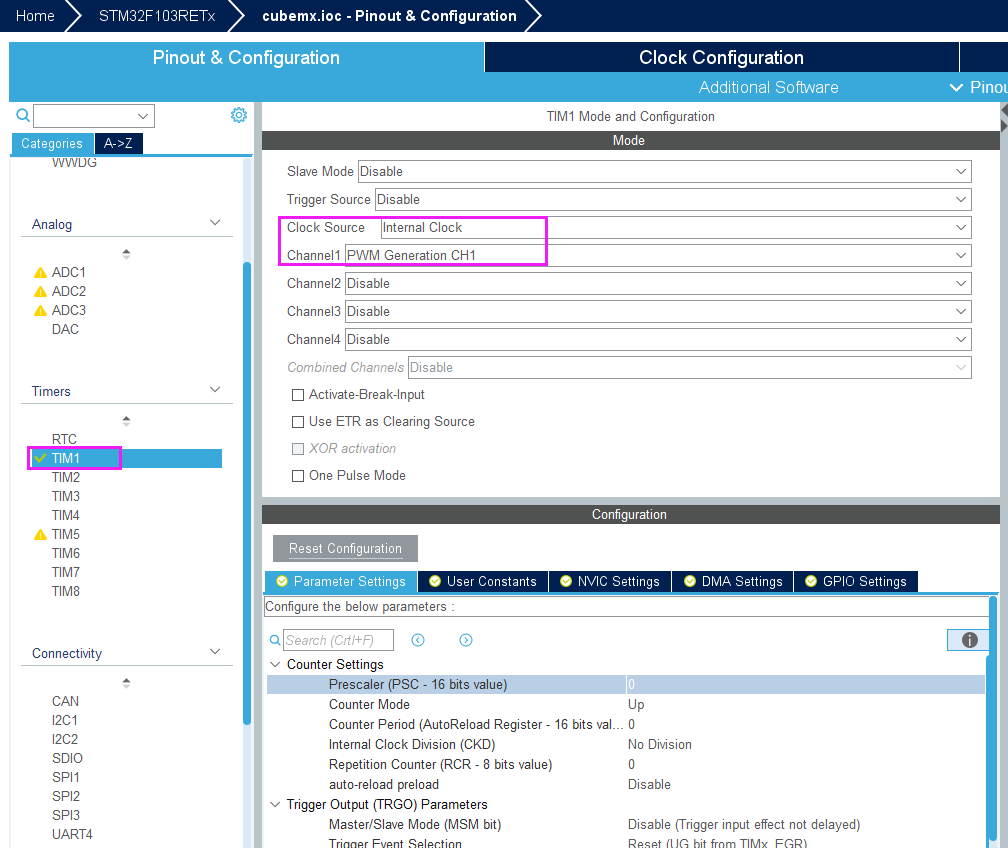
STEP 3:使用 cubemx 生成,pwm 的初始化相关代码 HAL_TIM_Base_MspInit 和 HAL_TIM_MspPostInit (只需要修改红色标记就可以,其他的我们使用 rtt 中提供的 API 来修改就好,drv_pwm_set 函数中会根据用户需要的周期和占空比自动计算相应的参数),并拷贝到 board.c 中。
static rt_err_t drv_pwm_set(TIM_HandleTypeDef *htim, struct rt_pwm_configuration *configuration)
{
rt_uint32_t period, pulse;
rt_uint64_t tim_clock, psc;
/* Converts the channel number to the channel number of Hal library */
rt_uint32_t channel = 0x04 * (configuration->channel - 1);
... ...
/* Convert nanosecond to frequency and duty cycle. 1s = 1 * 1000 * 1000 * 1000 ns */
tim_clock /= 1000000UL;
period = (unsigned long long)configuration->period * tim_clock / 1000ULL ;
psc = period / MAX_PERIOD + 1;
period = period / psc;
__HAL_TIM_SET_PRESCALER(htim, psc - 1);
if (period < MIN_PERIOD)
{
period = MIN_PERIOD;
}
__HAL_TIM_SET_AUTORELOAD(htim, period - 1);
pulse = (unsigned long long)configuration->pulse * tim_clock / psc / 1000ULL;
if (pulse < MIN_PULSE)
{
pulse = MIN_PULSE;
}
else if (pulse > period)
{
pulse = period;
}
__HAL_TIM_SET_COMPARE(htim, channel, pulse - 1);
__HAL_TIM_SET_COUNTER(htim, 0);
/* Update frequency value */
HAL_TIM_GenerateEvent(htim, TIM_EVENTSOURCE_UPDATE);
return RT_EOK;
}
```
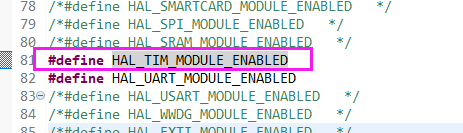
- STEP 4:修改 stm32xxxx_hal_config.h 文件,打开 HAL 对相关功能的支持。
- 需要在 pwm_config.h 文件中自己构建 PWM1_CONFIG ,否则使用 PWM1 时,编译报错。
```cpp
#ifdef BSP_USING_PWM1
#ifndef PWM1_CONFIG
#define PWM1_CONFIG \
{ \
.tim_handle.Instance = TIM1, \
.name = "pwm1", \
.channel = 0 \
}
#endif /* PWM1_CONFIG */
#endif /* BSP_USING_PWM1 */
```
### 第二步、完善对 PWM 初始化及测试的代码
创建路径 “RttDemo\applications\service\pwm” 并创建文件 “PwmChanel1.h” “PwmChanel1.c”。
- “PwmChanel1.h” 内容如下:
```cpp
/*
* Change Logs:
* Date Author Notes
* 2020-10-23 ZhangFan first version
*/
#ifndef _PWM_CHANEL_1_H_
#define _PWM_CHANEL_1_H_
#include <rtdevice.h>
rt_bool_t pwm_ch1_init();
/* 设置PWM1 的频率 */
rt_bool_t pwm_ch1_set_freq(rt_uint32_t freq);
/* 设置PWM1 的占空比 */
rt_bool_t pwm_ch1_set_duty(rt_uint32_t duty);
#endif //_PWM_CHANEL_1_H_
- “PwmChanel1.c” 内容如下:
/*
 * Change Logs:
 * Date           Author       Notes
 * 2020-10-21     ZhangFan     first version
 */

#include "PwmChanel1.h"

/* log */
#define DBG_TAG    "PwmChanel1"
#define DBG_LVL    DBG_LOG
#include <rtdbg.h>

/* pwm chanel */
#define PWM_DEV_NAME        "pwm1"  /* PWM设备名称 */
#define PWM_DEV_CHANNEL     1       /* PWM通道 */
struct rt_device_pwm *pwm_dev;      /* PWM设备句柄 */

rt_uint32_t period = 500000000;     /* 周期为5ms,单位为纳秒ns */
rt_uint32_t pulse  = 250000000;     /* PWM脉冲宽度值,单位为纳秒ns */

rt_bool_t pwm_ch1_init()
{
    /* step 1、查找设备 */
    pwm_dev = (struct rt_device_pwm *)rt_device_find(PWM_DEV_NAME);
    if (pwm_dev == RT_NULL)
    {
        LOG_D("pwm run failed! can't find %s device!\n", PWM_DEV_NAME);
        return RT_FALSE;
    }

    /* step 2、设置PWM周期和脉冲宽度 */
    rt_pwm_set(pwm_dev, PWM_DEV_CHANNEL, period, pulse);

    /* step 3、使能 PWM 设备的输出通道 */
    rt_pwm_enable(pwm_dev, PWM_DEV_CHANNEL);

    return RT_TRUE;
}

/* 设置PWM1 的频率 */
rt_bool_t pwm_ch1_set_freq(rt_uint32_t freq)
{
    if(RT_EOK != rt_pwm_set(pwm_dev, PWM_DEV_CHANNEL, freq, pulse))
    {
        return RT_FALSE;
    }

    period = freq;

    return RT_TRUE;
}

/* 设置PWM1 的占空比 */
rt_bool_t pwm_ch1_set_duty(rt_uint32_t duty)
{
    if(RT_EOK != rt_pwm_set(pwm_dev, PWM_DEV_CHANNEL, period, duty))
    {
        return RT_FALSE;
    }

    pulse = duty;

    return RT_TRUE;
}
- “main.c”函数内容:
#include <rtthread.h>

#define DBG_TAG "main"
#define DBG_LVL DBG_LOG
#include <rtdbg.h>

#include "SerialUart2.h"
#include "PwmChanel1.h"

int main(void)
{
    int count = 1;

    serial2_init(); /* 串口2初始化 */
    pwm_ch1_init(); /* PWM 初始化 */

    while (count++)
    {
        //LOG_D("Hello RT-Thread!");
        serial2_write("Hello RT-Thread!\r\n", sizeof("Hello RT-Thread!\r\n") - 1);
        rt_thread_mdelay(1000);
    }

    return RT_EOK;
}
第三步、烧写并测试
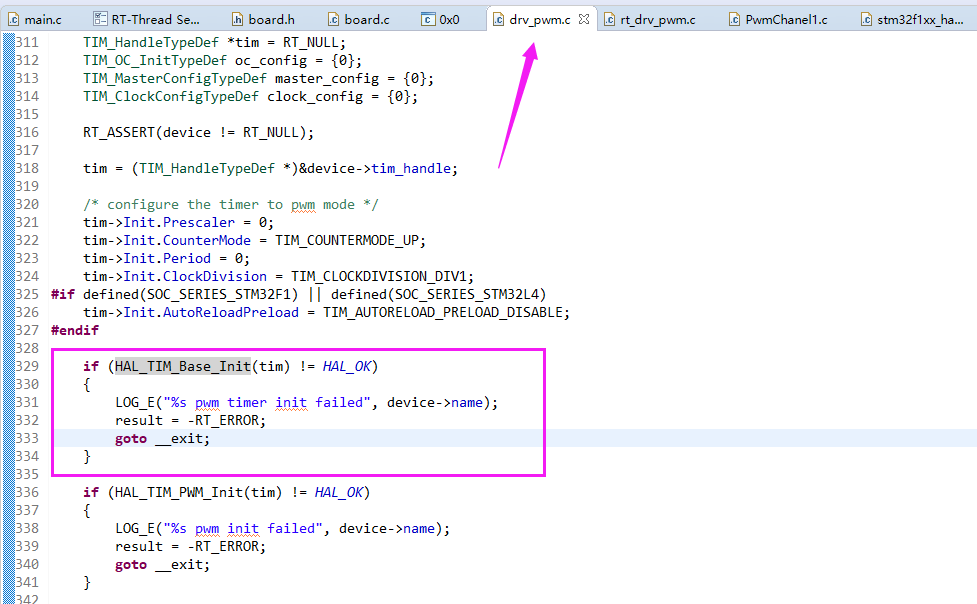
测试但是一直没有 PWM 波形输出,去论坛转了转,发现这个帖子:
增加下边这部分代码:
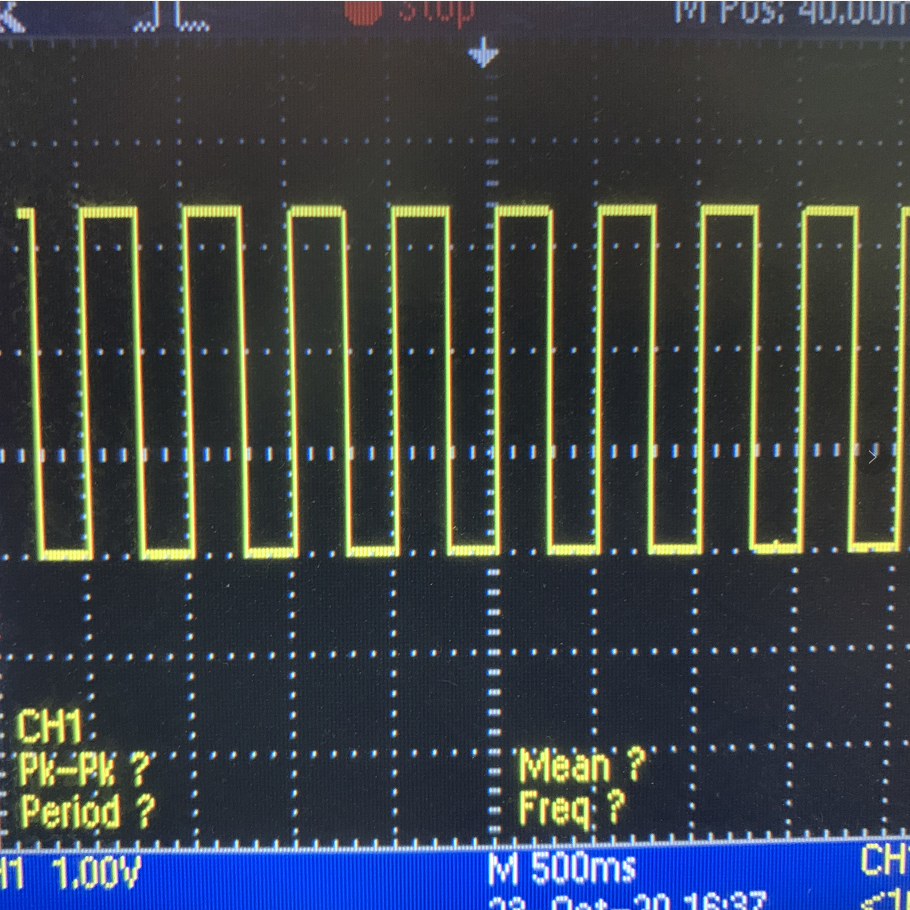
修改后再次测试,波形出现:
第四步、总结注意点
大概说几点需要注意的:
- 当使用 pwm 设备时,rtt 会在 stm32_hw_pwm_init 函数中,初始化对应的 Timer 不需要用户单独去初始化。
- stm32_hw_pwm_init 函数存在 Bug ,没有调用 “HAL_TIM_Base_Init” 函数。
- 要加 BSP_USING_PWM1_CH1 个宏。
- pwm_config.h 文件中自己构建 PWM1_CONFIG。
