
摘要:接着PWM之后,本文将继续增加 Timer,用来做串口数据的分包。
第一步、利用 RT-Thread Studio 配置 TIMER 相关代码(接着 PWM 项目进行)
首先在 board.h 中官方给出了如何在 rtt 中使用 HWTIMER。
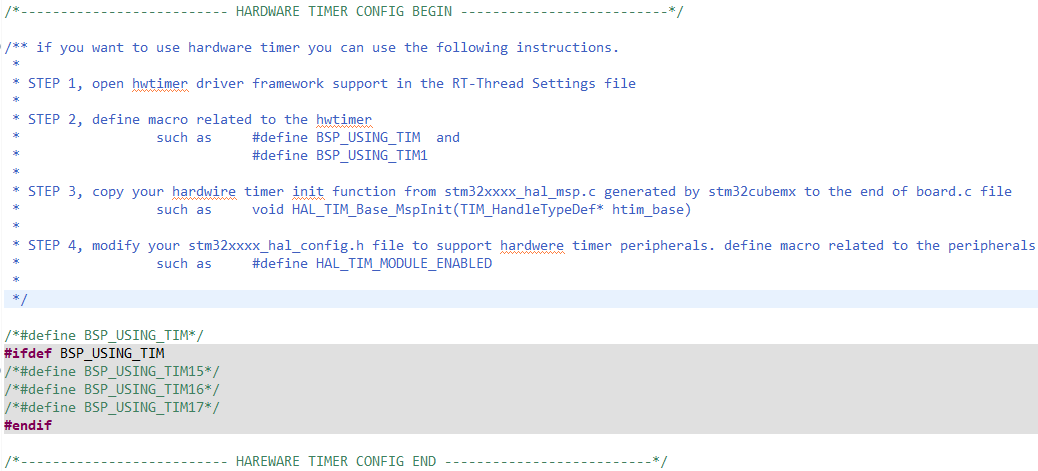
- STEP 1:RT-Thread Settings 中打开 hwtimer 驱动支持。
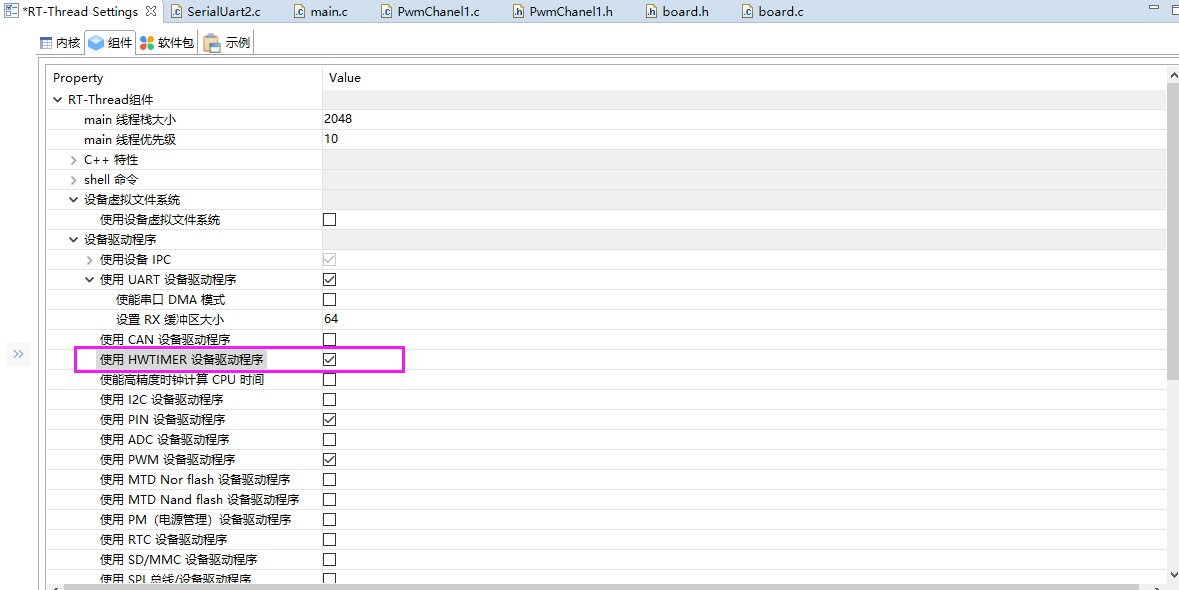
-
STEP 2:在 board.h 中定义相关宏,这里注意 “BSP_USING_PWM1_CH1 ”,这个也是需要的,可以看。
/** if you want to use hardware timer you can use the following instructions. * * STEP 1, open hwtimer driver framework support in the RT-Thread Settings file * * STEP 2, define macro related to the hwtimer * such as #define BSP_USING_TIM and * #define BSP_USING_TIM1 * * STEP 3, copy your hardwire timer init function from stm32xxxx_hal_msp.c generated by stm32cubemx to the end of board.c file * such as void HAL_TIM_Base_MspInit(TIM_HandleTypeDef* htim_base) * * STEP 4, modify your stm32xxxx_hal_config.h file to support hardwere timer peripherals. define macro related to the peripherals * such as #define HAL_TIM_MODULE_ENABLED * */ #define BSP_USING_TIM #ifdef BSP_USING_TIM #define BSP_USING_TIM2 /*#define BSP_USING_TIM16*/ /*#define BSP_USING_TIM17*/ #endif -
STEP 3:使用 cubemx 生成 hwtimer 的初始化相关代码 HAL_TIM_Base_MspInit (只需要修改红色标记就可以,其他的我们使用 rtt 中提供的 API 来修改就好,timer_init 会处理。),并拷贝 HAL_TIM_Base_MspInit 到 board.c 中。

/* 主要是下边的函数中对定时器的设置 */
static void timer_init(struct rt_hwtimer_device *timer, rt_uint32_t state)
{
    uint32_t prescaler_value = 0;
    TIM_HandleTypeDef *tim = RT_NULL;
    struct stm32_hwtimer *tim_device = RT_NULL;

    RT_ASSERT(timer != RT_NULL);
    if (state)
    {
        tim = (TIM_HandleTypeDef *)timer->parent.user_data;
        tim_device = (struct stm32_hwtimer *)timer;

        /* time init */

				... ...

        if (HAL_TIM_Base_Init(tim) != HAL_OK)
        {
            LOG_E("%s init failed", tim_device->name);
            return;
        }
        else
        {
            /* set the TIMx priority */
            HAL_NVIC_SetPriority(tim_device->tim_irqn, 3, 0);

            /* enable the TIMx global Interrupt */
            HAL_NVIC_EnableIRQ(tim_device->tim_irqn);

            /* clear update flag */
            __HAL_TIM_CLEAR_FLAG(tim, TIM_FLAG_UPDATE);
            /* enable update request source */
            __HAL_TIM_URS_ENABLE(tim);

            LOG_D("%s init success", tim_device->name);
        }
    }
}
/**
* @brief TIM_Base MSP Initialization
* This function configures the hardware resources used in this example
* @param htim_base: TIM_Base handle pointer
* @retval None
*/
void HAL_TIM_Base_MspInit(TIM_HandleTypeDef* htim_base)
{
  if(htim_base->Instance==TIM1)
  {
  /* USER CODE BEGIN TIM1_MspInit 0 */

  /* USER CODE END TIM1_MspInit 0 */
    /* Peripheral clock enable */
    __HAL_RCC_TIM1_CLK_ENABLE();
  /* USER CODE BEGIN TIM1_MspInit 1 */

  /* USER CODE END TIM1_MspInit 1 */
  }
  else if(htim_base->Instance==TIM2)
  {
  /* USER CODE BEGIN TIM2_MspInit 0 */

  /* USER CODE END TIM2_MspInit 0 */
    /* Peripheral clock enable */
    __HAL_RCC_TIM2_CLK_ENABLE();
  /* USER CODE BEGIN TIM2_MspInit 1 */

  /* USER CODE END TIM2_MspInit 1 */
  }

}
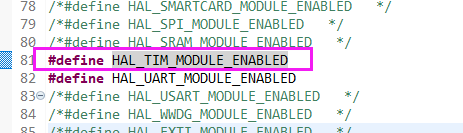
- STEP 4:修改 stm32xxxx_hal_config.h 文件,打开 HAL 对相关功能的支持。
第二步、完善对 PWM 初始化及测试的代码
RTT 定时器设备使用流程:
- 以读写方式打开设备
- 设置超时回调函数(如果需要)
- 根据需要设置定时模式(单次/周期)
- 设置计数频率(可选)
- 写入超时值,定时器随即启动
- 停止定时器(可选)
- 关闭设备(如果需要)
创建路径 “RttDemo\applications\service\timer” 并创建文件 “Timer2.h” “Timer2.c”。
-
“Timer2.h” 内容如下:
/* * Copyright (c) 2006-2020, Linfeng Electronic Technology Co., Ltd * * Change Logs: * Date Author Notes * 2020-10-23 ZhangFan first version */ #ifndef _TIMER_2_H_ #define _TIMER_2_H_ #include <rtdevice.h> typedef rt_err_t (*timeoutfunc)(rt_uint32_t cnt); rt_bool_t timer2_init(); /* 超时事件注册器,注:事件函数中不应该有耗时操作 */ rt_bool_t timer2_timeout_event_register(timeoutfunc func); #endif //_TIMER_2_H_ -
“Timer2.c” 内容如下:
#include "Timer2.h" #include <string.h> /* log */ #define DBG_TAG "Timer2" #define DBG_LVL DBG_LOG #include <rtdbg.h> #define HWTIMER_DEV_NAME "timer2" /* 定时器名称 */ #define FUNC_MAX_COUNT 10 typedef struct _timeoutfunclist { timeoutfunc timeoutfuncs[FUNC_MAX_COUNT]; /* 超时函数列表 */ rt_int8_t count; /* 超时函数列表实际个数 */ }timeoutfunclist; rt_device_t hw_dev = RT_NULL; /* 定时器设备句柄 */ rt_int32_t timerticks = 0; /* 定时计数器 */ timeoutfunclist funclist; /* 超时回调函数列表 */ /* 定时器超时回调函数 */ static rt_err_t timeout_cb(rt_device_t dev, rt_size_t size) { timerticks++; for(rt_int8_t i = 0; i < funclist.count; i++) { funclist.timeoutfuncs[funclist.count](timerticks); } return 0; } /* 设置定时器特性 */ static rt_bool_t timer2_default_set() { rt_err_t ret = RT_EOK; rt_hwtimerval_t timeout_s; /* 定时器超时值 */ rt_hwtimer_mode_t mode; /* 定时器模式 */ /* 设置模式为周期性定时器 */ mode = HWTIMER_MODE_PERIOD; ret = rt_device_control(hw_dev, HWTIMER_CTRL_MODE_SET, &mode); if (ret != RT_EOK) { LOG_D("set mode failed! ret is :%d\n", ret); return ret; } /* 设置定时器超时值为5s并启动定时器 */ timeout_s.sec = 0; /* 秒 */ timeout_s.usec = 2 * 100000; /* 微秒 */ if (rt_device_write(hw_dev, 0, &timeout_s, sizeof(timeout_s)) != sizeof(timeout_s)) { LOG_D("set timeout value failed\n"); return RT_ERROR; } /* 延时3500ms */ rt_thread_mdelay(3500); /* 读取定时器当前值 */ rt_device_read(hw_dev, 0, &timeout_s, sizeof(timeout_s)); LOG_D("Read: Sec = %d, Usec = %d\n", timeout_s.sec, timeout_s.usec); return RT_TRUE; } rt_bool_t timer2_init() { rt_err_t ret = RT_EOK; memset(&funclist, 0, sizeof(funclist)); /* 查找定时器设备 */ hw_dev = rt_device_find(HWTIMER_DEV_NAME); if (hw_dev == RT_NULL) { LOG_D("hwtimer sample run failed! can't find %s device!\n", HWTIMER_DEV_NAME); return RT_FALSE; } /* 以读写方式打开设备 */ ret = rt_device_open(hw_dev, RT_DEVICE_OFLAG_RDWR); if (ret != RT_EOK) { LOG_D("open %s device failed!\n", HWTIMER_DEV_NAME); return RT_FALSE; } /* 设置超时回调函数 */ ret = rt_device_set_rx_indicate(hw_dev, timeout_cb); if (ret != RT_EOK) { LOG_D("%s set timeout callback failed!\n", HWTIMER_DEV_NAME); return RT_FALSE; } /* 定时器默认设置 */ if(!timer2_default_set()) { LOG_D("%s set failed!\n", HWTIMER_DEV_NAME); return RT_FALSE; } return RT_TRUE; } /* 超时事件注册器,注:事件函数中不应该有耗时操作 */ rt_bool_t timer2_timeout_event_register(timeoutfunc func) { if(funclist.count >= FUNC_MAX_COUNT) { return RT_FALSE; } funclist.timeoutfuncs[funclist.count] = func; funclist.count++; return RT_TRUE; } -
“main.c”函数内容:
#include <rtthread.h>

#define DBG_TAG "main"
#define DBG_LVL DBG_LOG
#include <rtdbg.h>

#include "SerialUart2.h"
#include "PwmChanel1.h"
#include "Timer2.h"

int main(void)
{
    int count = 1;

    serial2_init(); /* 串口2初始化 */
    pwm_ch1_init(); /* PWM 初始化 */
    timer2_init();  /* TIMER初始化 */

    while (count++)
    {
        //LOG_D("Hello RT-Thread!");
        serial2_write("Hello RT-Thread!\r\n", sizeof("Hello RT-Thread!\r\n") - 1);
        rt_thread_mdelay(1000);
    }

    return RT_EOK;
}
第三步、烧写并测试
定时器回调函数被触发,证明程序工作正常,后边我们只需要通过 “timer2_timeout_event_register” 函数注册用户自己的定时任务就可以,这里写的比较简单,因为我这边主要后期用于检测 uart 接收超时分包。
